V1

Nextiles App

smart fabric, personalized insights

Our team partnered with Nextiles to create an iOS application to compliment their smart sleeve that collects data on biomechanics used for professional athletes to track their performance and improve over time.

Our team partnered with Nextiles to create an iOS application to compliment their smart sleeve that collects data on biomechanics used for professional athletes to track their performance and improve over time.

CATEGORY

CATEGORY

Wearable Tech • Sports Performance • AI

Wearable Tech • Sports Performance • AI

TIMELINE

TIMELINE

3 weeks

3 weeks

SKILLS

SKILLS

Product design

User research & testing
Visual identity
Interactive prototyping
Stakeholder management

Product design

User research & testing
Visual identity
Interactive prototyping
Stakeholder management

TEAM

TEAM

3x UX Designers • CEO

3x UX Designers • CEO

MY ROLE

Product Designer

  • Led end-to-end product design from user research through high-fidelity prototypes in a 3-week sprint


  • Collaborated directly with Nextiles CEO to understand hardware & software technical constraints


  • Spearheaded creating visual identity and UI components for the iOS application

  • Led end-to-end product design from user research through high-fidelity prototypes in a 3-week sprint


  • Collaborated directly with Nextiles CEO to understand hardware & software technical constraints


  • Spearheaded creating visual identity and UI components for the iOS application

BACKGROUND

What is Nextiles?

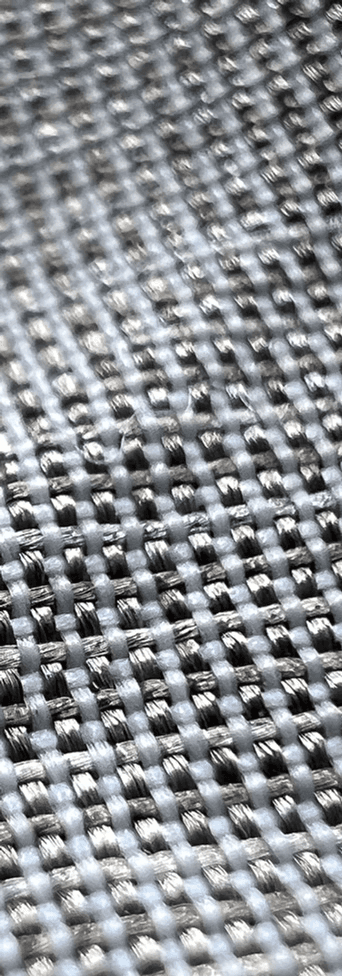
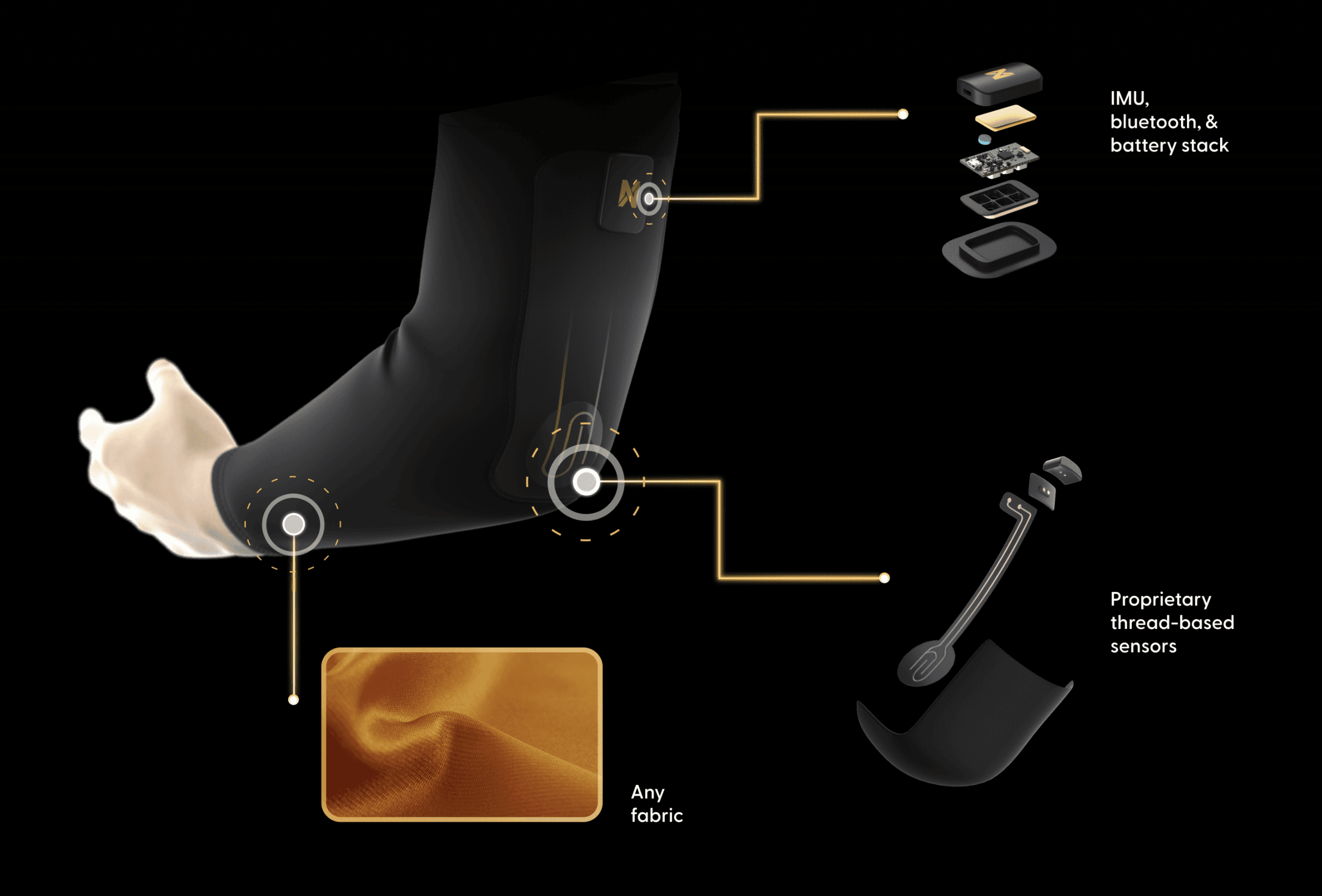
Nextiles is a company that seamlessly integrates technology into clothing. Semiconductive threads are machine embroidered into textiles to create sensory patterns that are responsive to force: bending, stretching, and pressure.

Athletes slip on the smart sleeve and turn on the microcontroller unit attached to the sleeve. The sensors pick up motion data which is then collected and transferred via Bluetooth to either a phone or computer to be displayed visually in real-time. This personalized data powered by AI, gives athletes valuable metrics to view and compare over time to help them improve and prevent injuries.

BACKGROUND

What is Nextiles?

Nextiles is a company that seamlessly integrates technology into clothing. Semiconductive threads are machine embroidered into textiles to create sensory patterns that are responsive to force: bending, stretching, and pressure.

Athletes slip on the smart sleeve and turn on the microcontroller unit attached to the sleeve. The sensors pick up motion data which is then collected and transferred via Bluetooth to either a phone or computer to be displayed visually in real-time. This personalized data powered by AI, gives athletes valuable metrics to view and compare over time to help them improve and prevent injuries.

PROBLEM

PROBLEM

Monitoring arm health and performance from anywhere

Monitoring arm health and performance from anywhere

The Nextiles app was created to help visualize and interpret complex data to improve athletic performance over time.


How can we display valuable metrics in a digestible way to be easily interpreted as actionable feedback?

CHALLENGES

CHALLENGES

What do athletes want to track?

What do athletes want to track?

  • What metrics are most important for athletes and coaches to track?

  • How can we create a smooth onboarding flow that allows athletes to connect their sleeve to the app

RESEARCH

RESEARCH

Understanding the training regiment of professional athletes

Understanding the training regiment of professional athletes

In order to understand the challenges athletes faced day to day in their training regiment and identify opportunities to help them track their progress, our team used these specific methodologies within our design process:

COMPETITION

Monitoring arm health and performance from anywhere

Our team wanted to pinpoint potential opportunities within this problem space to set ourselves apart, so we conducted a competitive feature analysis among 5 different smart ware companies that leveraged wearable technology that had a mobile application along with their physical product. We compared & contrasted different features they offered and discovered two areas these companies were lacking in:


  • visual rendering of motion

  • ability to track biomechanics metrics & stress levels

Timeline

The first phase of research began with understanding professional athletes. Our client had a very specific target audience in mind and he envisioned his physical product & app to be utilized by professional baseball and football players — specifically pitchers and quarterbacks. 


We were curious to learn about their:

  • Training schedules

  • Relationships with their coach/trainers

  • If they tracked their progress

  • Injury/recovery experiences

Conflict

So our team began reaching out to potential professional athletes for interviews however, we quickly realized the difficulty in getting a hold of athletes of this caliber. After consulting with our client, we agreed to shifted gears and interview a variety of participants via Zoom that:

  • Played sports competitively

  • Had frequent training schedules

  • Shared similar mindsets of constantly improving

  • Had experience with metrics

What We Learned

Statistics over time

Athletes compare their current practices to past practices to see areas of improvement

Lack of objective feedback

Athletes are frustrated with the subjective feedback from their coaches, which are based on perceptions & feelings from experience instead of measurable observations

Overexertion

Athletes tend to overexert their muscles during training, resulting in injuries

Training with multiple coaches

Athletes usually train with more than one coach at one time & appreciate their different perspectives

Pain Points

Our team wanted to understand players even further through a day in the life, so we created a journey map to help visualize his emotional timeline of highs and lows throughout his practice session from pre-practice, to during, to post-practice.

We identified 2 major pain points:
1. Player has suffered a previous injury in the past and is afraid it will affect his current performance.

2. Player is frustrated with the subjective feedback from his coaches with no actionable critique.

COMPETITION

Monitoring arm health and performance from anywhere

Our team wanted to pinpoint potential opportunities within this problem space to set ourselves apart, so we conducted a competitive feature analysis among 5 different smart ware companies that leveraged wearable technology that had a mobile application along with their physical product. We compared & contrasted different features they offered and discovered two areas these companies were lacking in:


  • visual rendering of motion

  • ability to track biomechanics metrics & stress levels (numerical information about an athlete's movement and the forces acting on their body)

CORE FEATURES

Narrowing down MVP

To begin our design phase, our team conducted a design studio with our client & CEO of Nextiles, George Sun. By quickly sketching our ideas onto paper for different features and layouts of screens, we were able to build off of one another’s ideas to create the final design.

SOLUTION

SOLUTION

The Nextiles App

The Nextiles App

Visually view & understand objective data in real-time

Visually view & understand objective data in real-time

See data dashboard of the metrics you are tracking and a in-depth informative analysis about what each graph is showing.

Compare your stats from the June 22nd and June 6th practices
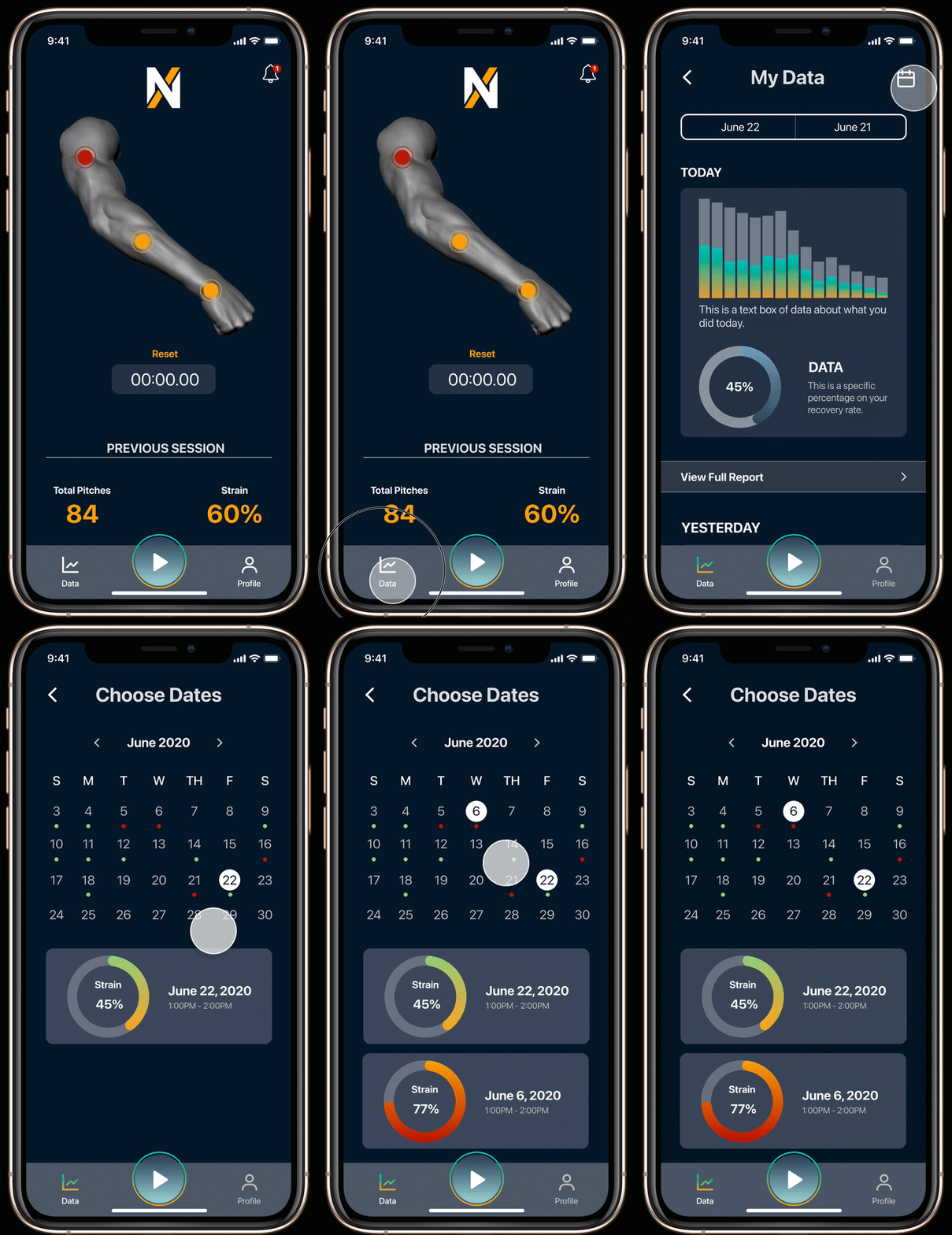
Compare your stats from the June 22nd and June 6th practices

Compare your stats from the June 22nd and June 6th practices

Send a daily summary to Coach Jim

Send a daily summary to Coach Jim

Share your data metrics with the coaches of your choosing.

Check your stress levels on your tricep to see if you are at risk for injury

Check your stress levels on your tricep to see if you are at risk for injury

Prevent injury by viewing your current condition and receive alerts about any serious muscle strain.
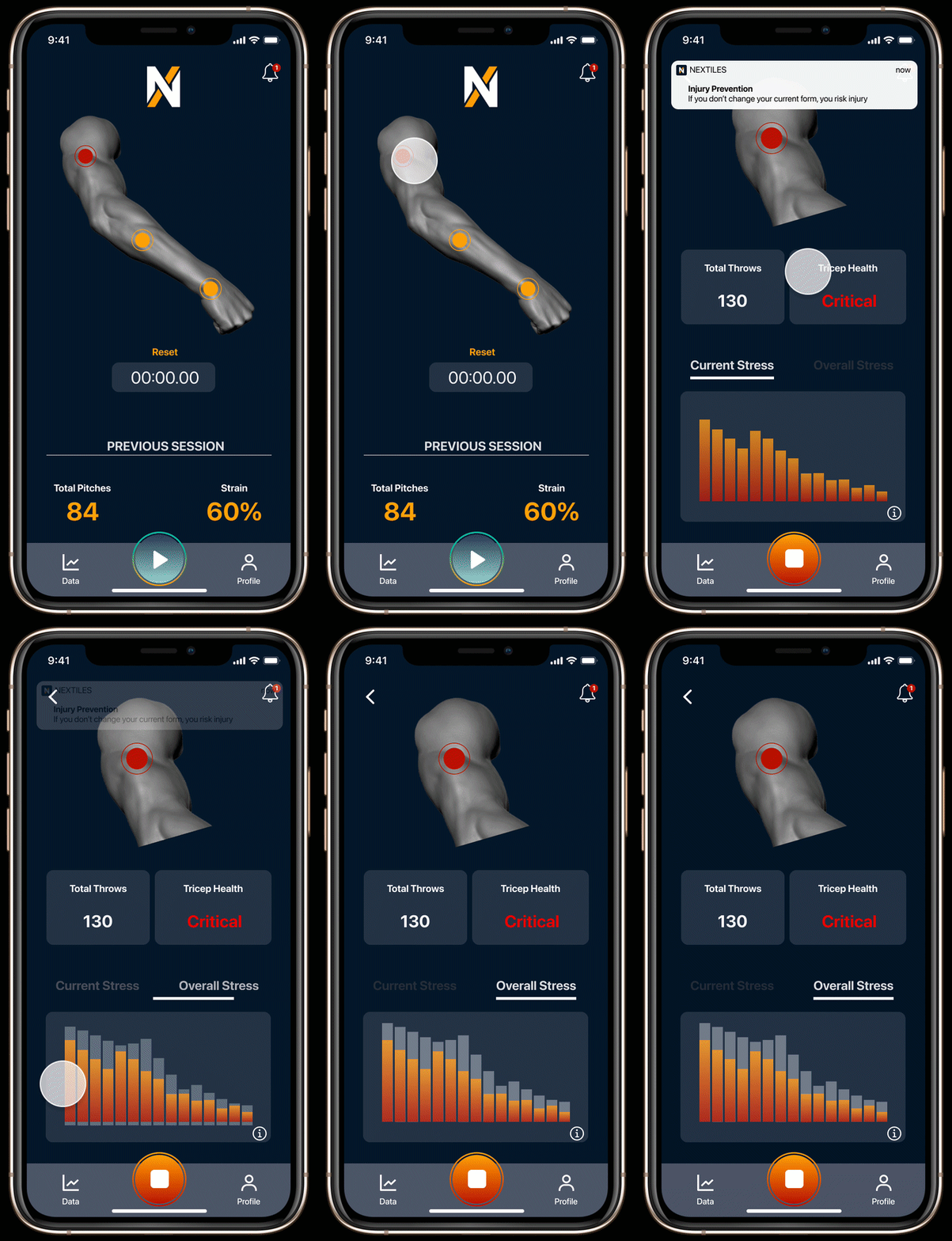
USER FEEDBACK

Iterations

We conducted usability testing with 10 athletes via Zoom on our mid-fidelity design to get a better understanding of how they navigated through our app. We discovered these areas were in need of improvement:

  • Athletes were not aware that the arm rendering was interactive

  • Athletes had a hard time locating the calendar feature

  • Athletes had trouble understanding how to interpret the visual data on the graphs

Problem
In round 1 of usability testing, athletes weren’t sure if they could actually click into the arm rendering to receive data because our mid-fi design did not look interactive. Also, athletes wanted to access the start session button more often and not just from the home page.


Solution
So once we got into Hi-Fi design, we were able to make these areas on the arm more noticeably clickable with 3-dimensionality and colored touch points. We also better integrated the start button for sessions into the main navigation for easier access.

Problem
In round 1 of usability testing, athletes weren’t sure if they could actually click into the arm rendering to receive data because our mid-fi design did not look interactive. Also, athletes wanted to access the start session button more often and not just from the home page.


Solution
So once we got into Hi-Fi design, we were able to make these areas on the arm more noticeably clickable with 3-dimensionality and colored touch points. We also better integrated the start button for sessions into the main navigation for easier access.

Problem
In round 1 of usability testing, many athletes scrolled by or did not initially notice the calendar icon.


Solution
So in our Hi-Fi design, by making the icon static on the “My Data” screen, it was more apparent.

Problem
In round 1 of usability testing, many athletes scrolled by or did not initially notice the calendar icon.


Solution
So in our Hi-Fi design, by making the icon static on the “My Data” screen, it was more apparent.

Problem
In round 1 of usability testing, many athletes were not sure about what kind of information were displayed on the graphs.


Solution
So in our Hi-Fi design, we added units of measure for clarification and the option to view more information is displayed by adding an information icon underneath each graph.

Problem
In round 1 of usability testing, many athletes were not sure about what kind of information were displayed on the graphs.


Solution
So in our Hi-Fi design, we added units of measure for clarification and the option to view more information is displayed by adding an information icon underneath each graph.

IMPACT

Ituitive Task Completion

USER FEEDBACK

Iterations

We conducted usability testing with 5 athletes via Zoom on our mid-fidelity design to get a better understanding of how they navigated through our app. We discovered these areas were in need of improvement:


  • Athletes were not aware that the arm rendering was interactive

  • Athletes had a hard time locating the calendar feature

  • Athletes had trouble understanding how to interpret the visual data on the graphs

PROBLEM

In round 1 of usability testing, athletes weren’t sure if they could actually click into the arm rendering to receive data because our mid-fi design did not look interactive. Also, athletes wanted to access the start session button more often and not just from the home page.


SOLUTION

So once we got into Hi-Fi design, we were able to make these areas on the arm more noticeably clickable with 3-dimensionality and colored touch points. We also better integrated the start button for sessions into the main navigation for easier access.

PROBLEM

In round 1 of usability testing, many athletes scrolled by or did not initially notice the calendar icon.


SOLUTION

So in our Hi-Fi design, by making the icon static on the “My Data” screen, it was more apparent.

PROBLEM

In round 1 of usability testing, many athletes were not sure about what kind of information were displayed on the graphs.


SOLUTION

So in our Hi-Fi design, we added units of measure for clarification and the option to view more information is displayed by adding an information icon underneath each graph.

Task Success Rate

0
0

%

Time on Task

0
0

Secs faster

Secs faster

After iterating based on first-round feedback, we conducted a second round of usability testing with 10 athletes to validate the redesigned experience.


Task Success Rate: 97% (vs 60% in first round)

Athletes successfully completed core tasks—viewing real-time data, comparing sessions, sharing with coaches—with minimal friction.


Time on Task: 16 seconds faster

Athletes found and interpreted their performance data significantly faster, reducing cognitive load during time-sensitive training contexts.


Key Validation

  • Athletes found the arm rendering interactive and engaging (resolved first-round concern)

  • Calendar feature became discoverable and intuitive (major improvement)

  • Data visualization was clear enough to understand mid-practice


Client Outcome

The designs were delivered to Nextiles for development consideration and the designs were well received by George, the CEO. The company plans to expand beyond athletics into rehabilitation, wellness, and even automotive industries requiring biometric monitoring. They want to become the backbone of data infrastructure to provide insights into human engagement that was previously inaccessible.

REFLECTION

What This Project Taught Me & How I've Grown

IMPACT

Ituitive Task Completion

Task Success Rate

0

%

Time on Task

0

Secs faster

After iterating based on first-round feedback, we conducted a second round of usability testing with 10 athletes to validate the redesigned experience.


Task Success Rate: 97% (vs 60% in first round)

Athletes successfully completed core tasks—viewing real-time data, comparing sessions, sharing with coaches—with minimal friction.


Time on Task: 16 seconds faster

Athletes found and interpreted their performance data significantly faster, reducing cognitive load during time-sensitive training contexts.


Key Validation

  • Athletes found the arm rendering interactive and engaging (resolved first-round concern)

  • Calendar feature became discoverable and intuitive (major improvement)

  • Data visualization was clear enough to understand mid-practice


Client Outcome

The designs were delivered to Nextiles for development consideration and the designs were well received by George, the CEO. The company plans to expand beyond athletics into rehabilitation, wellness, and even automotive industries requiring biometric monitoring. They want to become the backbone of data infrastructure to provide insights into human engagement that was previously inaccessible.

What I Learned

While this project was quite complex in understanding different metrics and learning how to integrate a digital product with its existing physical product, it was rewarding being able to collaborate with our client, George and show him the final results of the app, which was well received. This project taught me the fundamentals of designing for complex data systems and the unique challenges of hardware/software integration.


Engineering Collaboration Gap

Due to the short timeline, I did not have the opportunity to work deeply with the engineering team on technical implementation. The hardware (smart sleeve with embedded sensors) was already in development, and our team focused primarily on the app interface design rather than the hardware-software integration challenges.


This was a significant learning gap. In professional settings, I've since learned that effective IoT design requires:

  • Early collaboration with engineering to understand sensor capabilities and limitations

  • Iterative prototyping to test technical feasibility alongside user needs

  • Trade-off discussions between ideal UX and technical constraints (battery life, data accuracy, connectivity)


What I Would Do Differently

  • Meet with the hardware engineer weekly to understand sensor accuracy, data latency, and Bluetooth connectivity constraints

  • Conduct user interviews with coaches, not just professional athletes

  • Prototype with real data from the sensors earlier (not just mock data) to understand visualization limitations

  • Design with battery life in mind (how real-time data display affects power consumption)

  • Create a technical specification document collaboratively with engineering

  • Test edge cases (what happens when the sleeve loses connection? low battery? sensor malfunction?)

  • Build in more realistic timelines that account for hardware development cycles (much slower than software-only projects)

REFLECTION

What This Project Taught Me & How I've Grown

What I Learned

While this project was quite complex in understanding different metrics and learning how to integrate a digital product with its existing physical product, it was rewarding being able to collaborate with our client, George and show him the final results of the app, which was well received. This project taught me the fundamentals of designing for complex data systems and the unique challenges of hardware/software integration.


Engineering Collaboration Gap

Due to the short timeline, I did not have the opportunity to work deeply with the engineering team on technical implementation. The hardware (smart sleeve with embedded sensors) was already in development, and our team focused primarily on the app interface design rather than the hardware-software integration challenges.


This was a significant learning gap. In professional settings, I've since learned that effective IoT design requires:

  • Early collaboration with engineering to understand sensor capabilities and limitations

  • Iterative prototyping to test technical feasibility alongside user needs

  • Trade-off discussions between ideal UX and technical constraints (battery life, data accuracy, connectivity)


What I Would Do Differently

  • Meet with the hardware engineer weekly to understand sensor accuracy, data latency, and Bluetooth connectivity constraints

  • Conduct user interviews with coaches, not just professional athletes

  • Prototype with real data from the sensors earlier (not just mock data) to understand visualization limitations

  • Design with battery life in mind (how real-time data display affects power consumption)

  • Create a technical specification document collaboratively with engineering

  • Test edge cases (what happens when the sleeve loses connection? low battery? sensor malfunction?)

  • Build in more realistic timelines that account for hardware development cycles (much slower than software-only projects)

next projects

UFC Fit App

Health & Wellness

Branding

Design Systems

UFC Fit App

Health & Wellness

Branding

Design Systems

UFC Fit App

Health & Wellness

Branding

Design Systems

BroadbandNow

eCommerce (B2C)

Design System

SEO

BroadbandNow

eCommerce (B2C)

Design System

SEO

BroadbandNow

eCommerce (B2C)

Design System

SEO